Setting up for a Network |
Top Previous Next |
Setting up Campground Master for networking is very simple, as long as your network meets the requirements. Network setup parameters and options can be found in the menu: Maintenance / Network Functions / Network Setup.
If you did not purchase the Networking option with your license, that will be needed before you can use this function. You can use the View / Product Authorizations function to see how many workstations your license authorizes you to network. If the number is 1, then you are not authorized for networking. Do not proceed with Network Setup until after you have purchased the networking option and entered the new authorization code that will be sent to you.
EXTREMELY IMPORTANT!
DO NOT "SHARE" THE DATABASE FILE BETWEEN MULTIPLE INSTANCES OF THE SOFTWARE.
THIS WILL RESULT IN A CORRUPTED DATABASE!
Campground Master uses TCP/IP communications to synchronize all data between computers in real time, rather than sharing the database file itself.
Because most computer administrators expect networking to be accomplished through a shared database file, it may take some effort to get past this assumption. Do not attempt to network multiple computers by loading the database through a mapped or shared drive, or in any way open or save the database through file sharing on the network. Please read through this entire networking section before attempting to set up networking for Campground Master. It's a very simple process, but must be done correctly.
Every computer running Campground Master must have its own copy of the database, on its own hard drive or other non-shared location. Never under any circumstances open a database file from more than one instance of Campground Master at the same time. If you're not sure how this will work, please read the section How Networking Works.
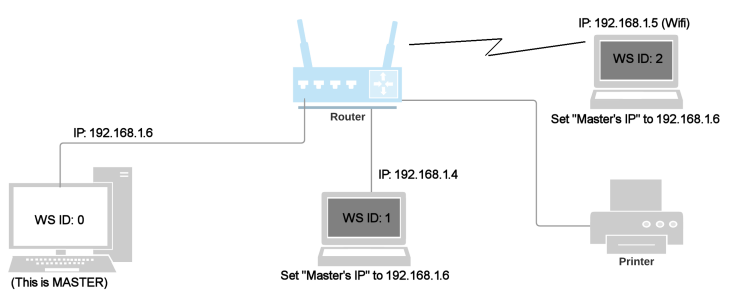
Here's a typical local network setup with the master and one laptop connected directly to a router and one laptop through WiFi (it doesn't matter to the setup whether it's wired or WiFi):
Quick Version of Network Setup (see below for more detailed steps)
These are useful for troubleshooting if it stops connecting, or when replacing or adding another computer.
This assumes that Campground Master is already set up (installed, database open, etc.) on the Master workstation (server).
This also assumes the database is authorized for Networking. You can use the View / Product Authorizations function to see how many workstations the license authorizes you to network. If the number is 1, then the database is not authorized for networking yet. Do not proceed with Network Setup until after you have purchased the networking option and entered the appropriate authorization code that will be sent to you.
1. Install the Campground Master software on each additional computer (workstation), and copy the database to each one.
Note: The computers do NOT all have to be running the same version of Windows. It makes no difference to the Campground Master networking.
2. On the Master workstation ("server"), go to Maintenance / Network Functions and select Show IP address for this workstation. Make a note of this number. (In the above diagram, it would have been 192.168.1.6)
Important: You do NOT need to use this "Show IP" function on any computer besides the master! All too often, people use this function on the client computers and worry that it shows a different number. Of course it does! It is normal, and in fact required, that each computer have a different IP address (just like your house has a different address than the one next door, so the mail goes to the right house), so don't use this function on the client computers and worry about them being different. That's normal! The ONLY function you should be using in the client computers is Network Setup, as explained in step 4.
3. On the Master workstation, go to Maintenance / Network Functions / Network Setup and note This workstation's ID (usually 0 for new installations) and the TCP/IP port number (usually 6010).
4. On each of the other workstations, go to Maintenance / Network Functions / Network Setup and change the Network Settings accordingly: The workstation ID should be different for each one (1, 2, 3, etc.), the Master IP address should be the address of the Master computer from step 2, and the Master's ID and port number should be as noted in step 3. Once you click OK (assuming changes were made), it should attempt connection.
Note: If you're attempting connection through the internet (not on the same local network as the master), see Networking through the Internet.
More Detailed Setup Information:
Networking Requirements:
•Every workstation or terminal must have its own place to save the database (e.g. its own hard drive) -- do not share the database file with other terminals.
•TCP/IP network -- the workstations must be connected via TCP/IP (which can also be through the Internet). We recommend using a switch (or router), rather than a hub, since a hub results in more load on the computers. Some installations have reported communications problems when using a simple hub.
•A known IP address for the master workstation -- The Master workstation must have a known IP address that can be accessed by the other workstations, so setting a static IP address on the local network is best. See the section following this one for more details. If you will be using the internet, you should also get a static IP address from your Internet provider (to avoid setup changes every time you connect).
•An unblocked port -- you can use any TCP/IP port number you wish, just make sure it's not blocked by any security software or routers in the system. The default is 6010. However, we have discovered that this is a common hacking target. While this won't matter if you're only using local networking, this can cause problems if you are using Networking through the Internet. See that section for details on selecting a different port.
Master workstation:
You don't need a separate computer for the Master. Any of the workstations can be used as the Master workstation. This workstation will automatically operate as a "server" for the Campground Master network, and all other workstations will operate as Clients. (Internally, they actually run different code depending on whether they are a server or a client.) However, it's not an actual "Server" in the traditional sense of networking. Also note that it should be turned on and running Campground Master all the time since it's the hub of communications, otherwise the other workstations cannot operate. The Master should have all power-saving and any sleep/hibernate/standby functions disabled as well.
Since the Master workstation will not have to request locks from other workstations and will operate "offline" automatically if the other workstations are disconnected, you may want the most-used workstation to be the Master. It should also be the fastest computer, since it has to do more work (routing all of the changes from each workstation to all other workstations).
Alternatively, you may decide that the master should be a "protected" computer separate from the reservation center, since it's the most important computer to keep running and should have the most reliable network connection. The decision will depend on your environment and whether speed is an issue. Since the master designation can be changed any time through the settings, you can always change it later.
Except for a few maintenance functions that can only be done on the master workstation, all workstations have equal abilities. Only the master workstation can perform the New database function and edit Field Definitions. Also, while any workstation can edit Raw Data Tables and Pick Lists, these should be done on the master workstation whenever possible due to the number of records that need to be locked.
Notes on using a real Server as the Master Workstation:
Because certain functions must be done at the Master workstation (the network master), and because Campground Master must be running as an application on the Master workstation, we don't recommend using a separate "server" computer as the Master. Also, it does not have to be a "Server" version of Windows -- a normal Windows "Home" version will work just as well as any version. Campground Master cannot be run as a service, and someone should be able to access the Master at any time for maintenance and other functions. Also remember that each workstation has the entire database, so besides having automatic redundancy, backups can be done from any of the workstations. And of course it should not be a "cloud server", since Campground Master is not designed as a cloud system.
Setup Procedure:
1. Install the Campground Master software on each computer (workstation), and decide which one will be the master. Do not copy your database yet! That will be done in step 5.
2. If you're not familiar with configuring program and/or port exceptions in firewall software and routers, temporarily disable all firewalls and other security software on each computer (they can be re-enabled with proper "exception" configurations once you get the network operational). Some typical programs that can block TCP/IP networking are Windows XP's firewall or Security Center, Norton's Antivirus with Internet Worm Protection, McAffee's Antivirus, ZoneAlarm, and various other antivirus software, spyware blockers, pop-up blockers, etc. If you're using a switch or router that has firewall/gateway/blocking capability, either disable it or make sure that the TCP/IP port you'll be using (see step 7) is not blocked.
3. After you have a initial database set up and network-enabled authorization code entered on the master / initial computer, make sure the database is authorized for networking. This can be checked through the View / View Product Authorizations function -- the "Max Workstations" value will be greater than 1 if you are authorized for networking. If you did not purchase the Networking option with your license, that will be needed before you can use this function. Do not proceed with Network Setup until after you have purchased the networking option and entered the new authorization code that will be sent to you. Enter the new code and verify that the Max Workstations is greater than 1.
4. To make sure that the printer options, tab view options and other settings will be the same on each workstation (especially if you have already been using the program on a single computer for awhile), synchronize the settings for all workstations. This can be done at any time, but doing it before you copy the database to the other workstations will ensure they are set up correctly to begin with. Note that this is essentially a database function and does not require the other workstations to be connected yet -- it simply copies the master's settings to the other workstation's settings in the database. This function is under Maintenance / Network Functions / Synchronize local options to other workstations.
5. Copy the database to each workstation. A step-by-step guide to copying the database to another computer can be found in the Maintenance chapter. Do NOT set up Campground Master to open the database file through a mapped drive on the network! If more than one workstation is accessing the same database file, the data will become corrupt. Each workstation should be loading and saving the database from its local hard drive. It's also important that the database have the same name on every workstation. Note: If you get an error when connecting that the names don't match, use the File / Rename Database command to change the name. Afterwards you might also need to go to Maintenance / Program Options / Database to change the auto-open database to the current one.
6. Find the IP address(es) of the master workstation (configure it for a static IP address if possible -- this is done in the Windows system, not in Campground Master). If you don't know its IP address, you can use the Show IP address(es) function under Maintenance / Network Functions. If it shows more than one address, you will need to figure out which one is for the local network and will be visible to the other workstations. Local network IP addresses often start with 192 or 169. The IPCONFIG command from a Command Prompt (DOS window) can also indicate the local area network's IP address.
Important: You do NOT need to use this "Show IP" function on any computer besides the master! All too often, people use this function on the client computers and worry that it shows a different number. Of course it does! It is normal, and in fact required, that each computer have a different IP address (just like your house has a different address than the one next door, so the mail goes to the right house), so don't use this function on the client computers and worry about them being different. That's normal! The ONLY function you should be using in the client computers is Network Setup, as explained in step 9.
7. Decide on a TCP/IP port number. You can use the arbitrary default port (6010), or if that is known to conflict with other software you can change it.
8. On the master workstation, open the database and make sure the Network Settings (Maintenance / Network Functions / Network Setup) are set accordingly: This workstation ID should be 0, and the Master ID should be 0. (The master ID can be another number, but this is the easiest way to keep track of it -- just make sure that the "This" ID and the "Master" ID are the same, that's what tells it to be the master.) The other options are covered later, but all of the check boxes should be checked. Note that you must be logged into Campground Master as an Administrator to get into this function.
9. On each of the other workstations, open the database (if not already open) and go to Maintenance / Network Functions / Network Setup to change the client's Network Settings accordingly: The workstation ID should be different for each one (1, 2, 3, etc.), the Master ID should be 0 (assuming that's the Master's ID set in step 8 above), and the Master IP address should be the address of the Master from step 6. You do not normally need to use "Show IP address for this workstation" on a client, but if you do then be aware that it is normal for the last number of the IP address to be different on each computer (just like each person will always have a different phone number).
If the master workstation is running at the time you perform the last step for each workstation, you should see it immediately connect after you change the settings and click OK.
If a connection error is shown, double-check your network settings and refer to the following sections, or contact us for support. If you are running a firewall, try disabling the firewall -- if connection is successful with the firewall disabled, you will need to determine how to enable the selected port for the firewall (consult the documentation for the firewall). Likewise, other security software may need to be disabled or configured to allow Campground Master to communication, such as Norton Internet Security, ZoneAlarm, McAfee, the Windows Defender / Windows Firewall, or various antivirus or anti-spyware software. Refer to your firewall's documentation or search online for details.
IMPORTANT: Once every workstation is connected, start re-enabling any security software that was disabled previously -- enable one program at a time, and double-check to make sure it doesn't interfere with networking by closing down both the Master and Client workstation(s) and restarting them. If it prevents connection, see if you can configure exceptions in the security software to enable the Campground Master software and/or the IP port you're using (see step 7 above). Under no circumstances should you leave your computer unprotected by keeping the firewall completely disabled.
Also STRONGLY recommended: Adding or replacing computers can often result in synchronization issues, especially if the steps are not done perfectly the first time. Therefore, please perform a Full Network Resynchronization as soon as possible after the new computer is connected (before bringing any other existing clients back up if possible). See here for details, but usually you can use the "One-Step" option: Full Network Resynchronization.
Workstation-specific settings for new computers
If you're setting up a new networked workstation, then be aware that there are a lot of workstation-specific settings you may need to configure for the new workstation. Note that this doesn't apply if you're just moving or re-installing with a workstation ID number that was used before.
Note: You can take a shortcut and synchronize most workstation-specific settings to be the same as the Master in one step -- however this will affect all workstations, not just the new one, so make sure you don't have some settings different on purpose. See "Synchronize local options to all workstations" under Maintenance / Network Setup.
1. Most important would be the Credit Card Processing Setup, if you're processing cards through Campground Master. You'll need to configure the new workstation to have the same settings as the other workstations. Note that the "Synchronize local options to all workstations" function mentioned above does not synchronize these because this could cause problems in some cases.
2. Any Tab View Options and default site filters, etc. are workstation-specific. While it's not critical that these be the same (they may be different on purpose), be aware that things may look different if the options are not the same.
3. Printing Options are workstation-specific. See Maintenance / Printing Options.
4. SMTP setup may be workstation-specific, unless you're using the "Global" option.
5. The default settings for most Reports (meter lists, occupancy report, etc), like filtering, grouping options, etc., are workstation-specific. While these are often changed each time you use them anyway, there may be common settings you are used to having set up already.
6. Printer Setup is computer-specific -- e.g. the selection of which printer is used for each type of receipt format. This is especially important if you use a separate printer for 3" receipts, for instance. See File / Printer Setup.
Additional Topics:
Networking Through the Internet
Setting up Multiple Connections
Firewall Configuration Information